Context & Problem
The original Timesheets feature was designed with a clear target user in mind: freelancers acting as their own business administrators. The interface supported:
- Weekly time logging.
- Multiple projects side by side.
- Flexible exports that freelancers could file or send as needed.
As adoption grew and our internal processes started to utilise this tool, a different use case emerged:
- Freelancers were logging hours monthly rather than weekly.
- The Sollective team used Timesheets as their primary reporting source to client back‑office staff.
- The end goal shifted from general record‑keeping to structured reporting and approval.
This mismatch led to several issues:
- The multi‑project, weekly input interface was cumbersome for freelancers who only needed to submit one monthly timesheet per engagement.
- Freelancers had to log time in Timesheets, export a PDF, and email it to back-office contacts, introducing manual steps and room for error.
- Analytics-focused elements from the original design were underused; many users were not migrating their entire workflow into FreelanceOS and preferred to pick specific tools for specific needs.
- The Sollective team had additional requirements, such as expense tracking, approvals, and verification, that were not supported in the initial design.
- In short, the tool was designed for a freelancer-first, analytics-oriented workflow, but had become central to a freelancer-back office reporting flow instead.
Goals
We decided to repurpose the timesheets infrastructure to better support our internal processes. This iteration focused on aligning the product with the actual workflows of our users:
- Reorient Timesheets toward monthly reporting and approval, rather than multi‑project weekly logging.
- Streamline input so freelancers can complete and submit timesheets with minimal friction.
- Build in capabilities needed by the internal Sollective team and client back offices (expenses, approvals, verification).
- Preserve familiarity by leaning into spreadsheet‑like interactions, while removing unnecessary analytics and complexity.
- Use AI‑assisted rapid prototyping to gather feedback quickly from founders, engineers, and operations.
Constraints
Key constraints included:
- A live production feature already in use by freelancers and internal staff; changes needed to improve the experience without breaking existing workflows.
- A small, cross‑functional team (co‑founder + front‑end + back‑end) responsible for both operations and delivery.
- The need to stay within the existing technical stack while minimising engineering overhead. Reuse existing components and patterns where possible.
- Operational requirements from the internal team that had to be met for the redesign to be considered successful.
Research & Insights
Reviewing the Existing Interface
The first step was a structured review of the existing Timesheets UI:
- Identified which elements were genuinely used vs. which were legacy or aspirational (e.g., analytics widgets and broader workflow features).
- Confirmed that users were not moving entire admin workflows into FreelanceOS; instead, they were selectively adopting specific tools, including Timesheets.
- Observed that the layout assumed frequent, multi‑project, weekly input - a pattern that didn't match the majority of freelancer behaviour.
Talking to Users
Interviews with freelancers and internal stakeholders surfaced several key insights:
- Freelancers were most familiar with Excel or spreadsheet interfaces in the context of time logging.
- The weekly, multi‑project input structure made navigation and data entry more complex than necessary for simple monthly reporting.
- Internal operations required more than just time totals:
- A monthly reporting model.
- Approve/reject functionality directly within the interface.
- Verification features to ensure reported hours matched internal records.
- Space for detailed notes, so freelancers could record what they worked on day by day.
These findings reframed Timesheets from a flexible, analytics‑adjacent tool into a structured workflow product: one that must guide users through a predictable monthly reporting process.
Design Approach
Refocusing on Monthly Reporting
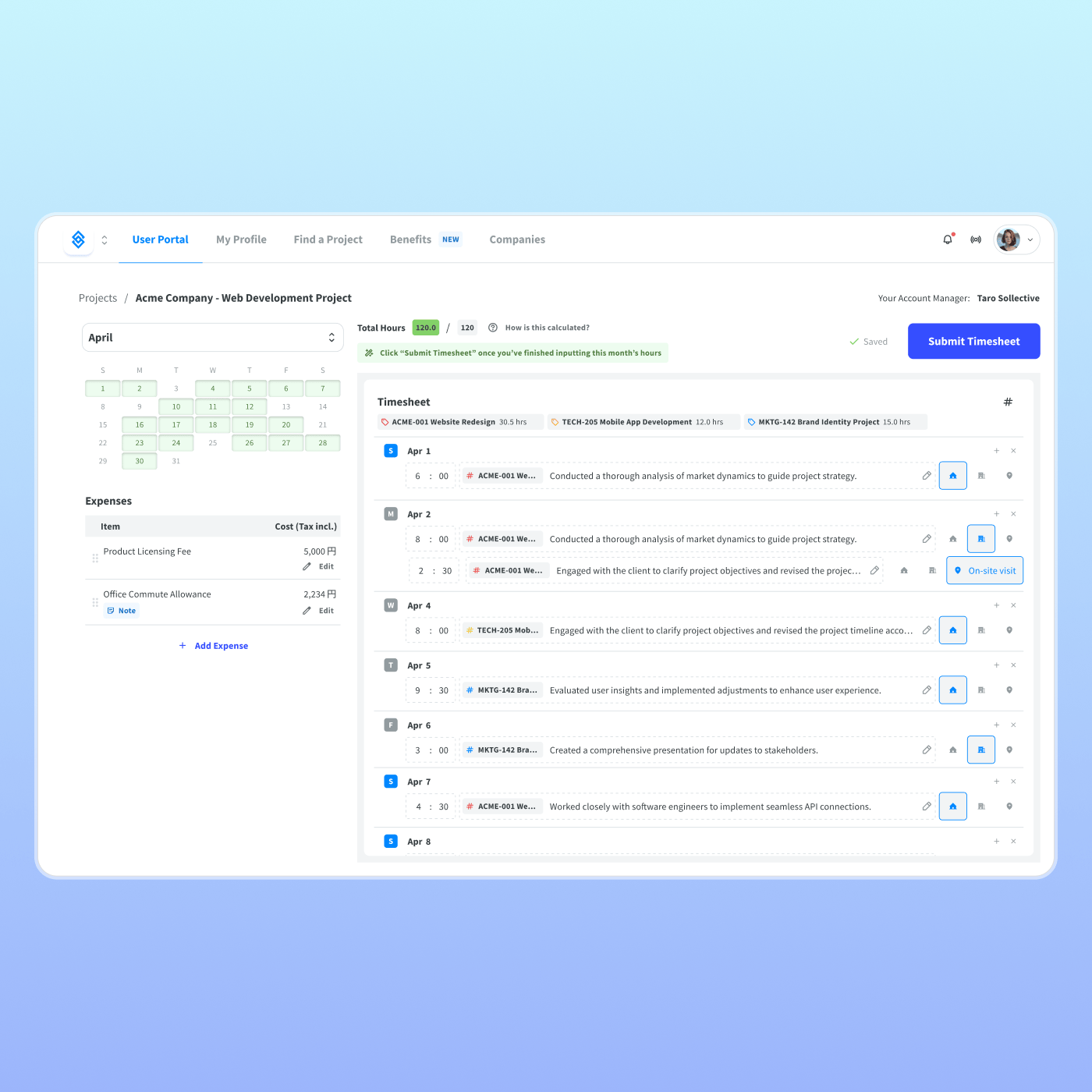
The redesigned experience shifted from weekly, multi‑project input to a monthly, engagement‑focused model:
- A single timesheet per engagement per month, aligned with how freelancers and back‑office staff actually collaborate.
- Simplified navigation that prioritises the current or most relevant month.
- Clear flows from "log hours" to "submit for approval" to "approved/rejected," rather than open‑ended logging.
Initially, a month list in a left‑side navigation panel allowed quick switching between months. Feedback from the team highlighted that this introduced unnecessary interface weight. A more focused solution was adopted:
- A simple month dropdown picker to change the active period.
- A default focus on the current reporting month, reducing navigation and decision-making for freelancers.
This supported the core behavioural goal: make timely monthly submission as easy and low‑friction as possible.
Aligning with Spreadsheet Mental Models
Given the strong association between time reporting and spreadsheets, the interface deliberately leaned into that mental model:
- Tabular layout with rows representing days and columns for hours, expenses, and notes.
- Inline editing that feels familiar to users accustomed to Excel or Google Sheets.
- Clear totals and summaries that help both freelancers and the internal team verify correctness at a glance.
To validate interaction patterns and edge cases, a spreadsheet-like prototype was built using Figma Make. This allowed simulation of input behaviour, navigation patterns, and state changes without committing engineering time prematurely.
Integrating Operational Requirements
The redesign baked internal and client-facing needs directly into the UI:
- Expenses: A dedicated area within the timesheet for expenses, preventing the need for parallel emails or separate spreadsheets.
- Approval Workflow: Interface support for approve/reject states so back‑office teams can handle timesheets in one place.
- Verification: Fields and views designed to make it easy to compare freelancer‑reported hours with internal records.
- Detailed Notes: Per‑record notes so freelancers can describe what they worked on each day, improving transparency and reducing back‑and‑forth questions.
These requirements guided both the information architecture and the visual hierarchy, ensuring that the most critical actions (logging, reviewing, approving) were always visible and straightforward.
Collaboration & AI‑Assisted Prototyping
The project relied on tight collaboration between product, engineering, and operations. Utilising AI tools like Figma Make allowed team members to provide early and actionable feedback. Stakeholders could interact with realistic behaviour early, rather than reacting to static mockups. The team could also quickly converge on a solution that balanced usability, technical feasibility, and operational requirements:
- Co‑founder: validated the approach against business objectives and freelancer experience.
- Front‑end and Back‑end Engineers: assessed technical feasibility and helped to define the scope of what could be delivered within constraints.
- Internal Back‑office Team: provided practical requirements and evaluated whether the new interface would genuinely reduce manual work.
Final Experience
The final Timesheets design delivered:
- A streamlined, monthly‑oriented input interface aligned with how freelancers and back‑office teams actually work.
- A spreadsheet‑like interaction model that feels familiar, while still being tailored to the specific timesheet use case.
- Integrated support for expenses, approvals, verification, and detailed notes within a single, coherent view.
- Reduced visual noise through the removal of underused analytics and features that did not directly contribute to reporting.
The result is an interface that serves both primary audiences - freelancers and internal staff - without forcing either group into cumbersome workarounds.
Outcomes & Impact
The redesigned Timesheets produced tangible improvements for both freelancers and the Sollective team:
- Improved usability: Freelancers and back‑office staff praised the new interface for its clarity and ease of use, particularly the more focused monthly flow.
- Operational efficiency: Integration with the internal reporting system eliminated manual export and email steps, significantly reducing time spent on repetitive reporting tasks.
- Reduced effort for freelancers: The reporting process shifted from a chore that could take hours each month to a streamlined workflow that typically took at most 30 minutes per freelancer per month.
- Alignment with real-world workflows: By removing unnecessary analytics and focusing the product on reporting, Timesheets became a better fit for how the platform's most engaged users actually worked.
Learnings & Reflection
The Timesheets redesign reinforced several principles for tooling in operationally complex environments:
- Products often expand beyond their original target user; redesigns must start with real usage, not the original intent.
- Aligning with existing mental models (like spreadsheets) can dramatically lower friction, especially in tasks like time reporting.
- Internal operational requirements (approvals, verification, expenses) are as important as the freelancer's individual experience when a tool sits between multiple parties.
- AI‑assisted prototyping can speed up exploration and allow teams to converge on interaction patterns that work across design, engineering, and operations.
This project now serves as a reference point for future workflow tools within FreelanceOS, demonstrating how a feature can evolve from a single‑persona utility into a multi‑stakeholder product without sacrificing clarity or ease of use.